
My bot detection broke my SEO and I fixed it by wrangling Angular, Nginx, and .NET Core into the shape I wanted.
Once I had the website up and running, I started meddling in Search Engine Optimisation (SEO), improving social media previews, and tightening security around probing requests. Not that anyone would find anything other than a 404 when poking around for WordPress endpoints or similar.
I wanted to understand how to configure this properly.
Then Google told me all my posts were just redirects.
And that sent me down a much deeper rabbit hole than I expected.
Before Things Got Complicated
When I started with web development (and also did it more seriously) the only way to deal with robots was to add robots.txt and hope for the best. Serious actors respected it, unserious ones just ignored it. And then you set up some structure in the .htaccess file. That part was black magic reserved for the mystical adeptus mechanicus of server administration, so I never really bothered looking into it further than "How can I make sure it serves index.php instead of index.html?". And now I found myself configuring my entire stack via this newfound Ehn-Jinx (Nginx).
In the beginning I was pleasantly surprised by how easy it was. Instead of some proprietary thing that sort of reminded me of YAML but still had its own validation schema, and god forbid if you accidentally have Windows line-endings... This thing had something that looked like JSON, and it didn't kick up a big fuss if you accidentally placed one element after another because the hard-coded parser couldn't handle it. Now, to start off, it is quite possible that .htaccess from Apache has improved since I last used it, but that is for another day to look into.
Another thing I realised had changed: Nginx was actually extremely lightweight. In the past, running one webpage on one server was a massive hardware undertaking. Granted, this was back in the day when hyper-threading and multi-threading were still fairly new, so once again I'm sorry Apache if the web server is easier and more lightweight nowadays.
Social media robots
Since this website is a Single Page Application (SPA), when dealing with this there are multiple issues. In the modern day there is more social media sharing going on, and these platforms do not render JavaScript reliably to grab previews. I don't hold it against them, because why would they? It would require a lot more complexity than just saying "use these tags in your header if you want previews and snippet text". However, I found this very hard to find information about. When I searched for things like "Why don't my previews show on LinkedIn" most responses were in the line of "You need to use meta tags", and LinkedIn doesn't really make it easy to find how to do that, but once you find it the guidance is clear. This is where I actually relied a lot on the lessons learned developing with AI.
Solution
Easy peasy, just create an Open Graph (OG) endpoint that I redirect robots to that more or less only returns the meta tags, and then redirect if it is an actual user. Seems easy enough, implemented - done!
location ~* ^/read/(.+)$ {
	set $post_slug $1;
	if ($http_user_agent ~* "LinkedInBot|Twitterbot|facebookexternalhit|WhatsApp|Slackbot|Discordbot|Googlebot") {
		return 302 https://api.carlsson.tech/v1/blog/og/$post_slug;
	}
}
The expected HTML is served by the API endpoint, and actual users get redirected via a client-side <meta http-equiv="refresh"...>. And I have a similar endpoint for projects.
emca@ubuntu:~$ curl -L -A "Mozilla/5.0 (compatible; LinkedInBot/1.0; +http://www.linkedin.com)" https://carlsson.tech/read/off-to-new-adventures
<!DOCTYPE html>
<html>
<head>
<title>Off to New Adventures</title>
<meta property="og:type" content="article" />
<meta property="og:title" content="Off to New Adventures" />
<meta property="og:description" content="Leaving Codeplay For the past three years, I've had the privilege (and occasional headache) of working at Codeplay as an Agile Coach. It’s been a wild,..." />
<meta property="og:image" content="https://api.carlsson.tech/v1/images/7e8f31f1-a05a-4c6f-86af-a751cf6e4eb2" />
<meta property="og:url" content="https://carlsson.tech/read/off-to-new-adventures" />
<meta name="twitter:card" content="summary_large_image" />
<meta name="twitter:title" content="Off to New Adventures" />
<meta name="twitter:description" content="Leaving Codeplay For the past three years, I've had the privilege (and occasional headache) of working at Codeplay as an Agile Coach. It’s been a wild,..." />
<meta name="twitter:image" content="https://api.carlsson.tech/v1/images/7e8f31f1-a05a-4c6f-86af-a751cf6e4eb2" />
<meta http-equiv="refresh" content="0;url=https://carlsson.tech/read/off-to-new-adventures" />
</head>
<body><a href="https://carlsson.tech/read/off-to-new-adventures">Redirecting...</a></body>
</html>
We can move on from this now... Or can we?
Google arrives
So, the sharp-eyed among you have noticed something that I didn't notice (and learned the hard way). Googlebot should not be in the list used there! Why not? It is a crawling bot, isn't it? A bot is a bot is a bot... NO! Bad Erik! That is not how it's done! Do not blindly trust that your AI assistant can actually see the entire context! I prompted "I want robots to be redirected to this endpoint" (let's pretend I've fixed the URL to be shown on e.g. LinkedIn as well). The assistant did exactly what it was told to do, and created a block that redirected all robots to that endpoint.
When adding Google to that list, it resulted in Google not wanting to index any of my blog posts or projects, because they are just a redirect to a different page! And it led me down a rabbit hole, and then I realised "Waaaait a minute! Maybe that return 302 https://api.carlsson.tech/v1/blog/og/$post_slug; isn't really what I want for a robot that I want to see the original page. Google is putting in a bit more effort to see what the user sees, and not just generating a preview. Ok, ok, let's change that and just remove Googlebot from that list. Yaaay! Done! Let's test it and pretend that we're a Googlebot:
emca@ubuntu:~$ curl -A "Googlebot/2.1 (+http://www.google.com/bot.html)" https://carlsson.tech/read/i-did-a-thing---and-now-i-have-two-bots

<!DOCTYPE html>
<html lang="en" class="uk-background-secondary" data-beasties-container="">
<head>
  <meta charset="utf-8">
  <title>
    Carlsson.tech | Erik Carlsson on Engineering, Projects, Agile, and Occasional Opinions
  </title>

  <base href="/">
  <meta name="viewport" content="width=device-width, initial-scale=1">

  <link rel="preconnect" href="https://api.carlsson.tech">
  <link rel="preconnect" href="https://pagead2.googlesyndication.com">
  <link rel="icon" type="image/png" href="assets/image/ec_transparent.png">

  <script
    async
    src="https://pagead2.googlesyndication.com/pagead/js/adsbygoogle.js?client=ca-pub-1709043967859294"
    crossorigin="anonymous">
  </script>

  <style>
    ...
  </style>

  <link rel="stylesheet" href="styles-QC4ITWUP.css" media="print" onload="this.media='all'">
  <noscript>
    <link rel="stylesheet" href="styles-QC4ITWUP.css">
  </noscript>
</head>

<body ngcm="">
  <app-root></app-root>

  <link rel="modulepreload" href="chunk-JYQQUOMP.js">
  <link rel="modulepreload" href="chunk-4SNEZTCZ.js">
  <link rel="modulepreload" href="chunk-3IMW2SDS.js">
  <link rel="modulepreload" href="chunk-JB75CREB.js">
  <link rel="modulepreload" href="chunk-EEMHM6KY.js">
  <link rel="modulepreload" href="chunk-ZZEZDYZU.js">
  <link rel="modulepreload" href="chunk-3S5JYRLU.js">
  <link rel="modulepreload" href="chunk-6772PKRB.js">
  <link rel="modulepreload" href="chunk-4C32SYE4.js">
  <link rel="modulepreload" href="chunk-JX4Z3CJT.js">

  <script src="polyfills-ZX45WAH4.js" type="module"></script>
  <script src="scripts-7BZFPIKL.js" defer></script>
  <script src="main-F24JVYXE.js" type="module"></script>
</body>
</html>
Ahh, dang it! The page has no content, why? Well, easy: this is a Single Page Application (SPA), and Google is initially working from the premise of "What you see (in a curl call) is what you get", not what can be rendered later using JavaScript. It can technically, but Google will do that in a separate rendering step, so relying on that is not recommended. Much better to return actual HTML. So this requires a bit more thinking and research.
A bit of theory
To be able to reach the outcome of having Googlebot see the fully rendered HTML, while a real user gets to experience a SPA, I needed to do some tinkering and research. This resulted in Server-Side Rendering (SSR) that would render the page on the server and send that as a response to the request. This is a Node.js thing, and it had minimal impact on my website from a user perspective. It still works in all ways as a regular SPA for the user, but the first request has all the DOM objects "pre-populated". And that is the benefit here: Googlebot gets a pre-populated webpage it can index directly. The user gets a SPA page that is responsive and doesn't have a lot of noticeable back and forth to the server. This works because the Google bot does not click like a user; the Google bot looks at the links and sends separate requests for those links.
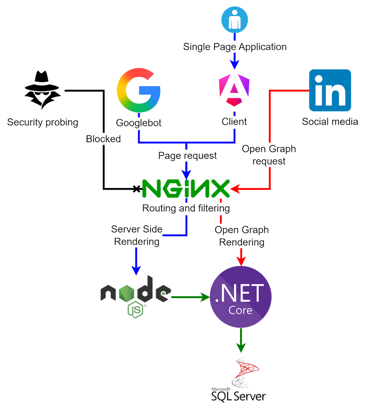
The result
So, now we have changed the configuration of Nginx to look like this:
location ~* ^/read/(.+)$ {
	set $post_slug $1;
	if ($http_user_agent ~* "LinkedInBot|Twitterbot|facebookexternalhit|WhatsApp|Slackbot|Discordbot") {
		return 302 https://api.carlsson.tech/v1/blog/og/$post_slug;
	}
	proxy_pass http://localhost:4000;
	proxy_set_header Host $host;
	proxy_set_header X-Real-IP $remote_addr;
	proxy_set_header X-Forwarded-For $proxy_add_x_forwarded_for;
	proxy_set_header X-Forwarded-Proto $scheme;
}

# All other routes — Node SSR
location / {
	proxy_pass http://localhost:4000;
	proxy_set_header Host $host;
	proxy_set_header X-Real-IP $remote_addr;
	proxy_set_header X-Forwarded-For $proxy_add_x_forwarded_for;
	proxy_set_header X-Forwarded-Proto $scheme;
}
The Googlebot is removed from the http_user_agent match, and we have added a few other things in here. A lot of proxy_*, this is because now instead of just serving the JavaScript, on the first request we are telling Nginx that we want the SSR response to go out, and that requires a bit of finagling. With this you can see that proxy_pass is set to localhost; this is perfectly fine for a site the size of mine. I don't have multiple servers running to be able to do load balancing, etc.
Also, to clarify, I am aware that it is quite easy to spoof user agent, after all I have even shown that I do that myself in this blog post, but the important part is more what robots to redirect, not to be able to catch them all like pokemons. The robots that are used by well established entities like LinkedIn, Facebook, Discord, etc. have in their best interest to be as consistent as possible. But there will always be exceptions, one example is Googlebot and Googlebot-Image. If you have a more distinct use-case than mine, it will pay off to spend more time finding these different bots and customise it to your need. But for me, this is a working solution.
Also, it should be made clear that serving different content to different bots is not always looked upon kindly. If you serve materially different content to search engines in order to manipulate rankings, that is cloaking. But Google also says dynamic rendering is not considered cloaking as long as the content is similar. In the case of social previews, this kind of bot-specific handling is common - but it is still something worth doing carefully.
And done
...not really, I still haven't done the first thing I set out to do: I wanted to get rid of people scanning my endpoints for WordPress vulnerabilities and trying to find my .htaccess file. Luckily, this is a lot easier.
# Block sensitive config and dotfiles
location ~* \.(json|config|env|log|ini)$ {
	deny all;
}

location ~ /\. {
	deny all;
}

# Block common vulnerability probes
# WordPress paths (this server does not run WordPress)
location ~* ^/(wp-admin|wp-login\.php|wp-content|wp-includes|xmlrpc\.php|wp-json) {
	return 404;
}

# PHP probes (this server runs ASP.NET Core, not PHP)
location ~* \.php$ {
	return 404;
}

# Common admin panel probes
location ~* ^/(phpmyadmin|pma|adminer|phpMyAdmin|myadmin|mysql|sql|db) {
	return 404;
}

# Backup and temp file probes
location ~* \.(bak|backup|old|orig|save|swp|tmp|sql|dump)$ {
	return 404;
}

# Common scanner targets
location ~* ^/(\.git|\.svn|\.htaccess|\.htpasswd|boaform|vendor|\.aws|\.ssh|\.well-known/(?!acme-challenge)) {
	return 404;
}
What is done here is that I know that I am not using any of this, and I am not going to allow anyone to see any of this, and it doesn't really affect any white-hat robots. The robots scanning these things wouldn't care what my robots.txt is saying anyway. So I can just blanket return 404 and save myself a fetch of plenty of different requests for endpoints that don't exist anyway.
Has this made them stop scanning me? Of course not, but it saves me some processing power and some traffic to just return "404" instead of my full application's rendering of a 404.
Why I ended up here
This is one of the ways that this issue can be solved. But I found this to be one of the simpler approaches with the highest pay-off.
There are a few limitations and constraints, there is one core issue behind this. Let's go over them.
The problem
I wanted to improve my SEO on this website, while still be able to share content on social media.
Bonus problem: I wanted to spare my code from as much noise from security probing as possible.
Constraints
- Back-end .NET Core
- Front-end Angular
- Served by Nginx
- Social media sharing already in place
There are also some other constraints (e.g. limited time, limited budget, etc.).
Alternatives
One alternative to this solution could have been to turn it into a more "traditional" request - response app. Render everything in the back-end and send it to the front-end pre-rendered. This would make it easier to deal with a lot of things in a language I am more familiar with, and templating it out in a way that I am used to. However, I didn't want to remove my front-end and with that remove the responsiveness for the end-user as a request - response flow will have more noticeable load times. And it would not have solved my bonus problem. It would also have complicated the back-end routing and have moved a large chunk of complexity code-wise to the back-end.
I could have made sure to render all of this information for social media in the actual code per page as well, and served it all via SSR. This did not really tickle my fancy as it would be giving the front-end the responsibility of sharing about 200 characters and one image on e.g. LinkedIn. This is such a small request that the overhead provided by Angular would be subpar, and it would also require more server-side CPU usage.
One of my goals from the start has been to separate the concerns of the different working parts of the site. With a SPA I send code once, and then reuse it across the entire application. There is a case to be made to just load specific scripts per page, but from an end-user perspective, the main reusable content can be found here. Home, Popular Projects and Popular Posts all share the same layouts and share code. No reason to remake it each time a user clicks and make them download it again. Latest Post and Latest Project also share a lot of reusable code. The only thing that changes there is the data population, not the actual structure.
For OG specifically, keeping the payload minimal matters. There is no reason to send a full page when the consumer only needs a title, description, and image. By bypassing the front-end, I reduce both compute and data transfer. As a side effect, it also saves end-user data, which adds up on restrictive mobile plans.
Neither of those alternatives addresses the bonus problem of security probing, which further pushed me toward a solution that separates concerns at the routing level.
So, in the end I landed on this solution as it had minimal impact on my current architecture, and minimal impact on the end-user (it likely improved the experience somewhat). It also opens up the ability to apply this across multiple instances if I need to scale.
A three-way split of the application makes it possible to scale individual parts independently, while still keeping responsibilities clearly separated. The Nginx configuration remains tied to the front-end, while OG creation is handled in the back-end, without making the front-end churn CPU and memory. That way, multiple social media requests do not affect front-end performance, and the back-end only needs to handle a minimal, focused part of the system.
This approach works well when rendering concerns and content generation are cleanly separated, and when different consumers (users vs crawlers vs preview bots) have fundamentally different requirements. It avoids pushing unnecessary work into the front-end, while keeping the system flexible enough to evolve.
I could have implemented this entirely in Angular, but given time constraints - and me being a data and back-end kind of guy - this was the most pragmatic solution.